Barcode Scan vs Label Photo: Which Should You Trust?

A barcode scan and an ingredient-label photo can lead to the same screen, but they do not provide the same evidence.

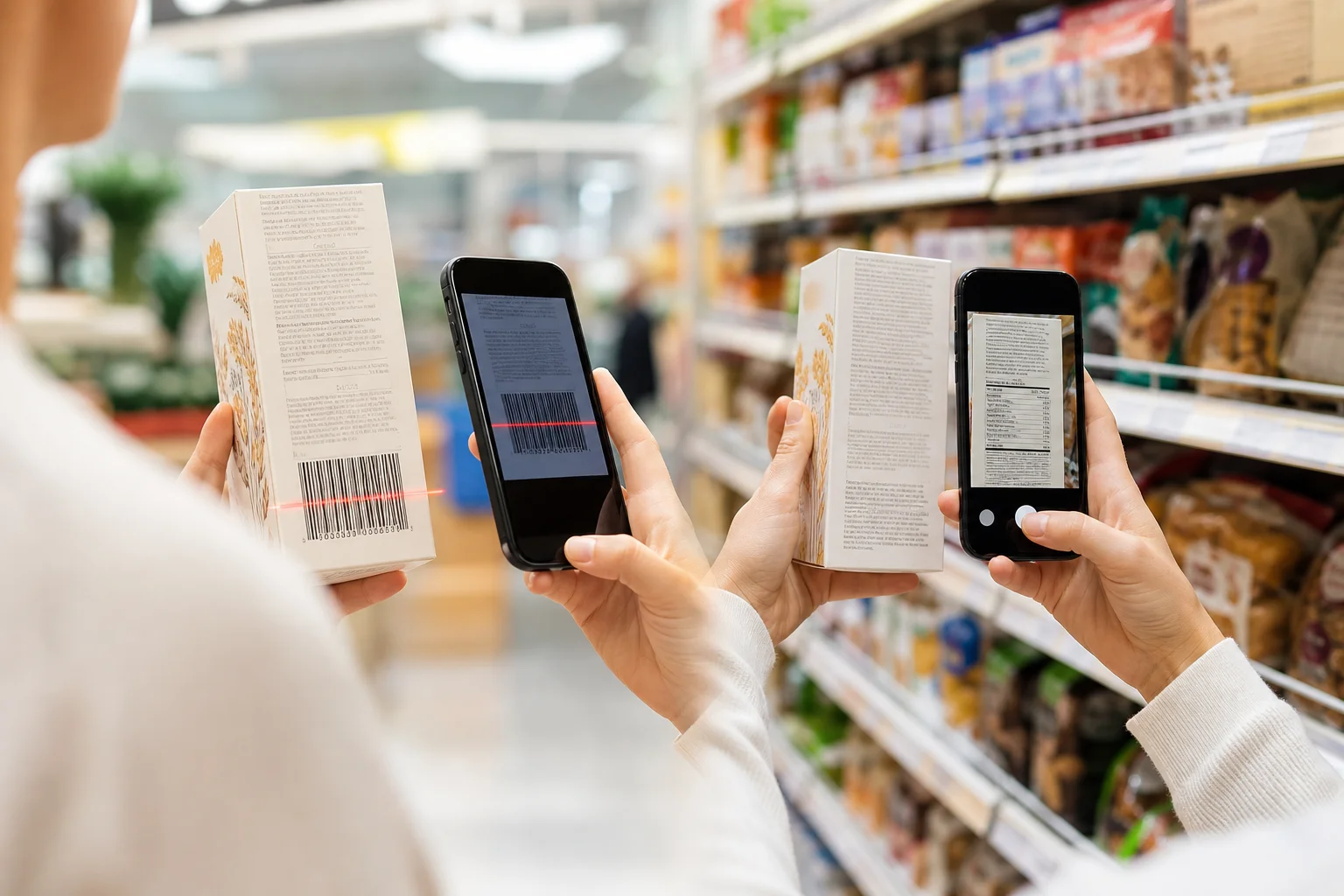
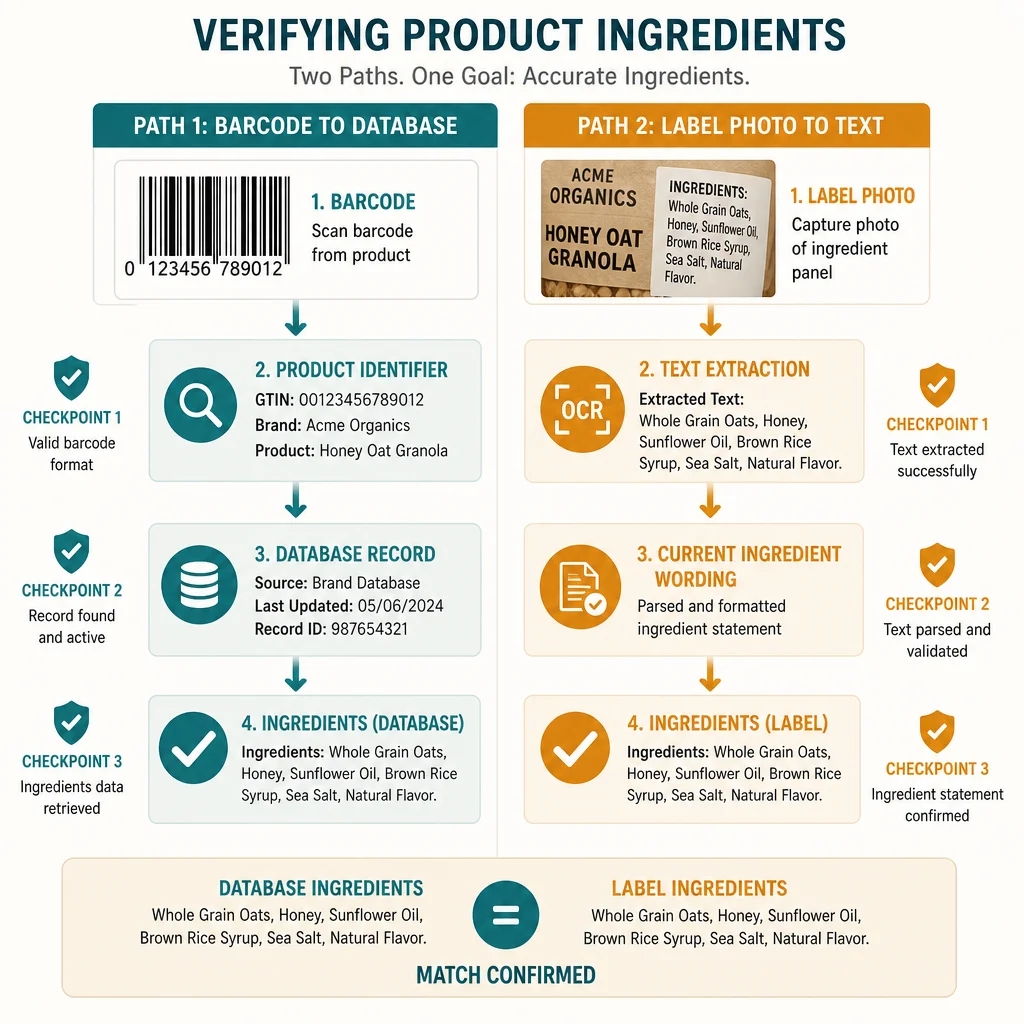
A barcode scan starts with a product identifier and asks a database for information. A label photo starts with the package in your hand and asks software to extract its visible text. The barcode path can be almost instant. The photo path can reflect the current formulation more directly.

Neither path deserves automatic trust. The better input depends on what is available, what can be verified, and what could go wrong.

This comparison was reviewed on July 29, 2026. It covers ordinary packaged-food shopping rather than the separate travel problem addressed in Barcode Not Found Abroad.
Short Answer

Start with the barcode because it is fast. Trust the result only after it matches the current package.

Switch to a label photo when:

  • the barcode returns no product;
  • the record has no ingredients;
  • the flavor, size, country, or image does not match;
  • the package says new recipe;
  • the ingredient list disagrees with the record;
  • allergen or precautionary wording is missing.

The current physical label wins when the two paths conflict. A clear photo of that label can be the better evidence, but only if it captures every relevant line.

A Barcode Is Usually a Key

GS1 identifies a Global Trade Item Number, or GTIN, as a way to identify a trade item in the supply chain. Common retail UPC and EAN barcodes encode that identifier.

The striped code does not usually contain a complete ingredient list. A food app reads the identifier, then queries a product database for fields associated with it.

The practical flow looks like this:

barcode → GTIN → product record → ingredients and other fields

The code can scan successfully while the last two steps fail. That is why a checkout scanner may recognize a product price while a food app says not found. The retailer and the food app are using different connected records for different jobs.

Where Barcode Lookups Are Strong

Barcode lookups are excellent when the connected record is:

  • present;
  • complete;
  • current;
  • matched to the exact variant;
  • clear about its source.

In that case, one scan can avoid typing a long ingredient list. It can also connect the ingredient data with nutrition facts, product images, category information, and saved household rules.

Databases can improve over time. Open Food Facts describes an open, collaborative product database that accepts photos and product data, runs quality checks, and publishes updated exports. That kind of shared record can make common packaged foods easy to retrieve.

The advantage is scale. A barcode can link one package to a structured record that many tools can reuse.

Where Barcode Lookups Fail

Where Barcode Lookups Fail

The main barcode risk is not the printed code. It is the record behind it.

Common problems include:

  • no matching product record;
  • ingredients missing from an otherwise valid record;
  • an old formulation;
  • another country or language variant;
  • a similar flavor or package size;
  • a user-entered mistake;
  • a product image that does not show the current back panel.

Reformulation deserves special attention. GS1's GTIN Management Standard explains that some changes to formulation or legally required declared information can require a new GTIN. Local rules and the nature of the change affect that decision. In real shopping, a changed package may receive a new identifier, but a database still needs the new record. Other updates can leave an app showing older information.

Do not assume the brand name proves a match. A chocolate, vanilla, and peanut-butter product can have different ingredients. So can a U.S. and U.K. version of the same brand.

What a Label Photo Adds

A label photo captures the ingredient wording printed on the current package. This makes it useful when the database path is uncertain.

The photo can preserve:

  • the complete ingredient list;
  • nested ingredients inside parentheses;
  • a separate Contains statement;
  • precautionary wording;
  • additive names and numbers;
  • a new recipe change;
  • the exact market language.

The photo is direct evidence, but it still passes through optical character recognition, image analysis, or manual transcription. A camera does not guarantee a complete reading.

Where Label Photos Fail

Where Label Photos Fail

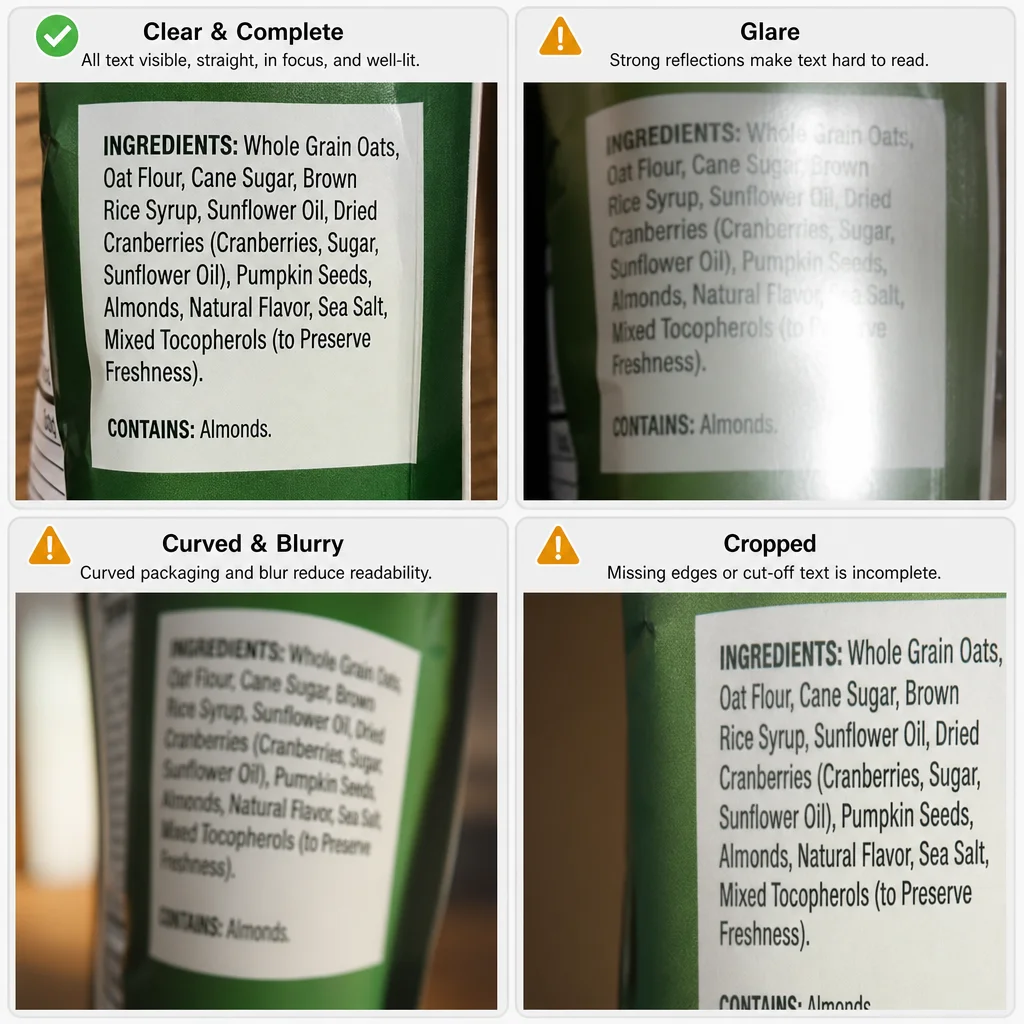
Food packages are difficult documents. They curve, shine, wrinkle, and place important text in small type.

A food-packaging OCR benchmark using real package images describes the challenge created by glare, curved surfaces, multilingual text, and inconsistent panel coverage. The lesson for shoppers is simple: image quality is part of data quality.

A label photo can fail when:

  • the first or last ingredients are cropped;
  • glare hides punctuation or a warning;
  • the camera focuses on the package art;
  • text wraps around a curved bottle;
  • a fold hides a sub-ingredient;
  • the allergen statement is on another panel;
  • a decorative font is misread;
  • multiple languages overlap or continue elsewhere.

One missing word can change a decision. May contain milk is not equivalent to contains milk, and cocoa butter should not become butter because the first word disappeared.

How to Take a Useful Ingredient Photo

Use a repeatable capture routine:

  1. Find the complete panel. Identify where the ingredient list starts, ends, and continues.
  2. Flatten or rotate the package. Reduce curves and wrinkles before focusing.
  3. Use even light. Move away from direct reflections.
  4. Hold the camera parallel. A steep angle makes the far edge less readable.
  5. Fill the frame without cropping. Keep the heading, first ingredient, and last ingredient.
  6. Capture warnings separately. Include Contains, may contain, facility, and certification wording.
  7. Review at full size. Zoom in and retake any uncertain line.

Take overlapping photos for a long wrapper or bottle. Repeating a few words at the edge helps confirm that no line was skipped.

The Decision Table

SituationBetter first inputWhy
Familiar product with a matching current recordBarcodeFast and structured
Product is not foundLabel photoBypasses the missing record
Package says new recipeLabel photoCaptures current wording
Ingredient panel is damaged or unreadableBarcode, then verify elsewherePhoto lacks usable evidence
Record shows another flavor or countryLabel photoExact package matters
You need a rapid first pass across many itemsBarcodeEfficient when records match
Critical warning sits on a separate panelMultiple label photosCoverage matters more than speed

The table is not a rule that photos are always newer or barcodes are always stale. It is a way to choose the path with the fewest hidden assumptions.

How to Verify a Barcode Result

Before relying on a retrieved product record:

  1. compare the product name and flavor;
  2. compare the package size;
  3. compare the front image where available;
  4. check the country or market;
  5. compare the first few and last few ingredients;
  6. review the physical allergen statement;
  7. look for a reformulation notice.

If any material detail differs, switch to the package.

For diagnosed allergies, the FDA's packaged-food allergen rules are an important baseline, but a database cannot replace checking the current ingredient and allergen declarations every time. Products and facilities can change.

How to Verify a Label-Photo Result

After text extraction:

  1. confirm the first and last ingredients;
  2. compare every parenthesis;
  3. check names that differ by one letter;
  4. verify additive numbers and decimal points;
  5. review allergen and precautionary lines separately;
  6. make sure a second language was not merged into the first;
  7. treat unreadable or private sourcing as unresolved.

The output should show uncertainty when text is incomplete. A confident conclusion from a cropped panel is worse than a clear not enough information result.

Barcode and Photo Are Inputs, Not Verdicts

Neither method decides whether a product fits a person. They supply data for the next step.

The decision may depend on:

  • a major allergen;
  • gluten or another dietary restriction;
  • an ingredient preference;
  • a household member's saved avoid list;
  • a certification;
  • a nutrient target;
  • a source the label does not disclose.

This is why the ingredient scanner versus food ingredient analyzer comparison separates capture from interpretation. A barcode or photo can be accurate while the final analysis asks the wrong question.

How IngrediCheck Uses Both Paths

IngrediCheck can start with a barcode lookup or an ingredient-label photo. Available ingredient information is then compared with each household member's saved Food Notes.

The barcode path is useful for speed. The photo path is useful when a record is missing, incomplete, or questionable. In both cases, the package remains part of the review.

IngrediCheck reports Matched, Unmatched, or Uncertain with supporting reasons. Those terms describe the available analyzed information. They are not certification, a universal food score, or a guarantee that a label disclosed every manufacturing risk.

To compare either input with saved household rules, use the food ingredient checker and verify the result against the current package.

IngrediCheck helps you use the faster barcode path when a current record is available and switch to the physical ingredient label when it is not. Whichever input you choose, verify the package, review the reason, and keep uncertainty visible before adding the product to your cart.

Frequently Asked Questions

Is a barcode scan more accurate than an ingredient-label photo?

A barcode scan is faster when it retrieves a complete current record. A label photo is more direct when the record is missing or stale, but its accuracy depends on focus, lighting, coverage, and text extraction.

Does a UPC barcode store the ingredient list?

Usually no. A UPC commonly encodes a GTIN product identifier. The scanning app uses that identifier to retrieve product information from a separate database.

What should I do if the barcode record and package disagree?

Use the current physical package as the decision source. Confirm the exact product variant and photograph the complete ingredient and allergen panels if the database record appears stale.

Can a label photo detect may-contain warnings?

Only if the warning is included, sharp, and correctly extracted. Photograph the ingredient list, Contains statement, precautionary wording, and any continuation panel separately when needed.

Next Label Check

Follow the scanner, hub, and ingredient paths connected to this guide

Get the app for clearer label decisions.

Scan labels, see what fits your food notes, and read the why in plain English.

IngrediCheck app