Ingredient Scanner vs Food Ingredient Analyzer: Key Differences

An ingredient scanner and a food ingredient analyzer sound like two names for the same tool. Sometimes they are bundled into one app, but the jobs are different.

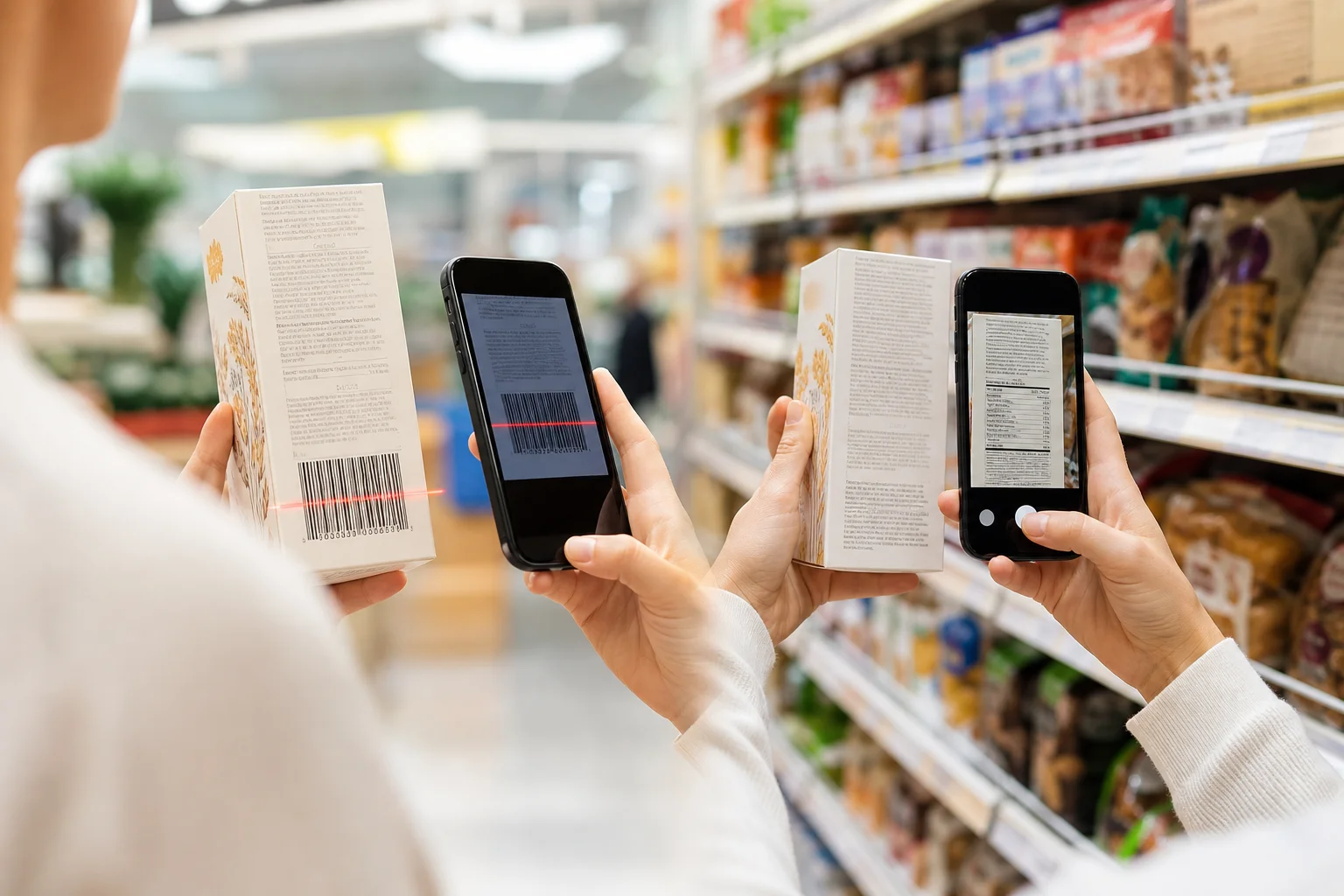
An ingredient scanner captures or retrieves information. It may scan a retail barcode, photograph an ingredient panel, or accept pasted text. A food ingredient analyzer interprets the resulting ingredient information. It may explain unfamiliar terms, compare the list with saved rules, identify possible allergens, or show why a product needs more review.

That difference matters when you choose an app. A fast scan is not useful if it opens an incomplete record. A detailed analysis is not reliable if it begins with cropped, outdated, or misread text.

This comparison was checked on July 29, 2026. It evaluates tool categories, not named competitors. The criteria are input quality, source transparency, rule matching, explanation, household support, and uncertainty handling.

Short Answer

Choose an ingredient scanner when your first problem is capturing the package quickly. Choose a food ingredient analyzer when your first problem is understanding what the captured ingredients mean for a specific decision.

For most grocery trips, the best workflow combines both:

  1. capture the barcode or current ingredient label;
  2. confirm the retrieved or extracted text matches the package;
  3. analyze that text against a defined question or saved rule;
  4. review the reason and any uncertainty before deciding.

The scanner is the front door. The analyzer is the reasoning room behind it.

What an Ingredient Scanner Actually Does

What an Ingredient Scanner Actually Does

A scanner begins with an input. The most common inputs are:

  • a UPC or EAN retail barcode;
  • an ingredient-label photo;
  • a product search;
  • pasted ingredient text;
  • a previously saved product record.

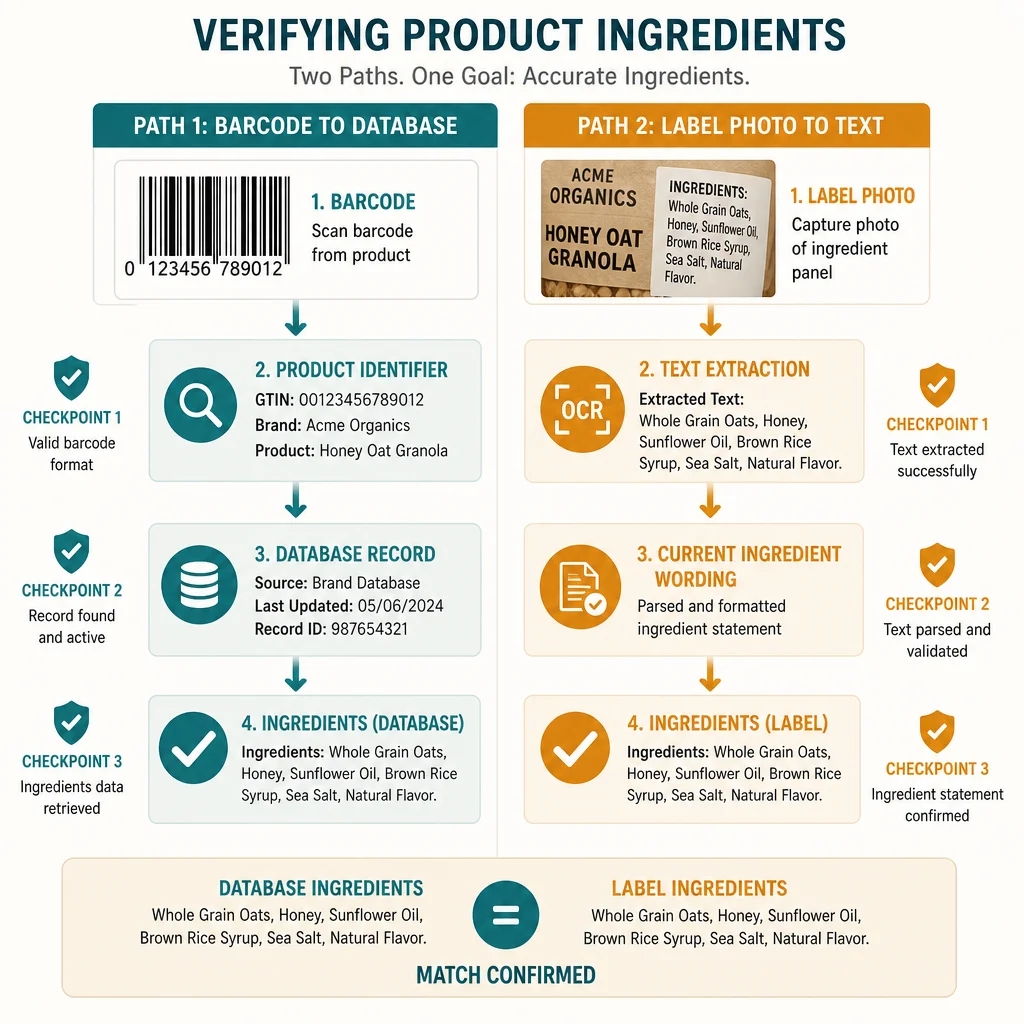
A common misunderstanding is that the ingredient list lives inside the striped retail barcode. GS1 explains that ordinary UPC and EAN symbols encode identifiers, including the Global Trade Item Number used to identify a trade item. The scanner then uses that identifier to request product information from a database.

This creates a chain:

barcode → product identifier → database record → ingredient data

Each link can succeed or fail. The barcode may scan perfectly while the database has no record. The record may exist without ingredients. It may describe another package size, country variant, or older formulation.

Label-photo scanning follows a different chain:

camera image → text extraction → ingredient structure → review

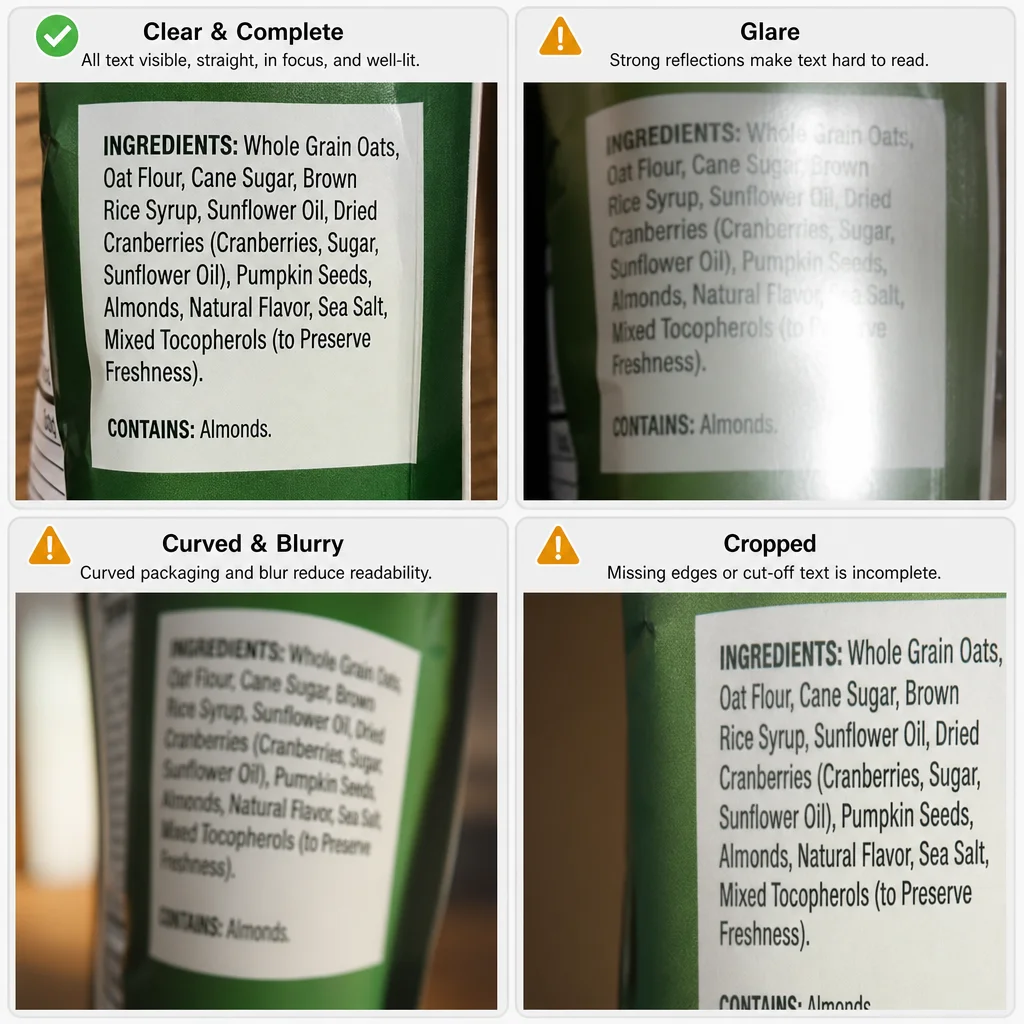
That path can work when a product record is missing, but the image introduces its own risks. Glare, folds, curved containers, tiny text, poor focus, and cropped warnings can remove information before analysis starts.

What a Food Ingredient Analyzer Does

An analyzer starts with ingredient information and applies a reasoning job. That job might be simple:

  • define an additive;
  • identify a preservative;
  • find a declared major allergen;
  • translate an E-number;
  • compare a list with vegan or vegetarian rules.

It can also be personalized:

  • compare ingredients with one person's allergy notes;
  • check a second profile with different restrictions;
  • flag a saved clean-label preference;
  • distinguish a direct conflict from an unclear source;
  • explain which ingredient caused the result.

The word analyzer does not guarantee medical authority or perfect certainty. It describes a processing step. The useful question is what evidence the analyzer uses, which rules it applies, and how it communicates missing information.

A universal food score is one type of analysis, but it is not the only type. A shopper with a sesame allergy, a shopper limiting sodium, and a vegan shopper can reasonably reach different decisions about the same package. One number can flatten those differences.

The Key Differences

DimensionIngredient scannerFood ingredient analyzer
Primary jobCapture or retrieve product informationInterpret ingredient information
Typical inputBarcode, photo, search, or pasted textIngredient list plus question or rules
Main strengthSpeed at the shelfExplanation and decision support
Main dependencyCamera quality or product databaseComplete input and sound rule logic
Common failureMissing, stale, or mismatched recordOverconfident conclusion from incomplete text
Best outputVerifiable product and ingredient dataReason, matched rule, and uncertainty

The categories overlap. A single app can scan first and analyze second. The table helps you evaluate the stages separately instead of trusting one marketing label.

Why Source Evidence Matters More Than the Feature Name

Why Source Evidence Matters More Than the Feature Name

The package contains several evidence layers:

  • the product identifier;
  • the current ingredient list;
  • nested sub-ingredients;
  • a Contains statement where required;
  • precautionary wording such as may contain;
  • the Nutrition Facts panel;
  • certifications and claims.

Under U.S. rules, ingredients generally use a common or usual name and follow specific declaration requirements. The Nutrition Facts panel answers another set of questions about serving size and nutrients. A scanner or analyzer that blends these panels into one unexplained verdict can make the result harder to audit.

Look for a tool that lets you trace the answer backward:

  1. Which package or photo supplied the data?
  2. Which ingredient wording was read?
  3. Which saved rule or reference matched?
  4. Was the result direct, inferred, or uncertain?
  5. What should you verify on the physical label?

Traceability is more useful than an impressive feature count.

Barcode Database vs Current Package

Product databases are valuable because they turn identifiers into useful records. Open Food Facts, for example, describes a collaborative database containing product ingredients, nutrition facts, and label images. Its documentation also provides a path for users to submit photos and information when data is missing.

That model illustrates both the value and the limit. A large database can make common products instant to retrieve. It can also contain gaps because products are added, corrected, reformulated, and sold in different markets.

The current package should settle a disagreement. If a retrieved record says one thing and the physical ingredient panel says another, do not average them together. Treat the record as stale or mismatched until verified.

The same rule applies to a sophisticated analyzer. Better reasoning cannot repair the wrong product input.

What Good Analysis Looks Like

A useful food ingredient analyzer should show:

  • the ingredient or phrase that triggered the result;
  • the household rule or question it compared against;
  • whether the match was direct or interpretive;
  • whether the source was a barcode record or label photo;
  • what information was missing;
  • whether another person in the household has a different result.

For example, soy lecithin found is more useful than avoid. Ingredient source unclear for your vegan rule is more honest than a confident pass. No conflict found in the available text is more precise than safe.

This is especially important for allergens. FDA labeling rules cover declared major allergens in packaged foods, but a tool still needs the complete label, and the shopper still needs to review precautionary statements and the exact package. No analyzer can see an undisclosed manufacturing fact.

When an Ingredient Scanner Is the Better Starting Point

Start with a scanner when:

  • you are comparing several products in a grocery aisle;
  • the package has a clear barcode and a likely current record;
  • you want to retrieve ingredients without typing;
  • you need a quick first pass against saved rules;
  • the label text is difficult to copy manually.

Barcode scanning is fastest when the record is present and matches. Label-photo scanning is stronger when the barcode record is absent, incomplete, or visibly outdated.

When an Analyzer Is the Better Starting Point

Start with an analyzer when:

  • you already have the ingredient text;
  • an unfamiliar additive needs explanation;
  • you want to compare a product with a personal avoid list;
  • different family members need separate decisions;
  • the same ingredient has aliases or additive codes;
  • you need the reason behind a result.

An analyzer is also useful after a scanner returns data. The workflow does not have to be either-or.

How to Choose a Tool

Use this seven-point check:

  1. Inputs: Does it support barcodes, label photos, and manual review?
  2. Current-package check: Can you compare the retrieved record with the package?
  3. Explanations: Does it name the ingredient and rule behind the result?
  4. Separate profiles: Can household members keep different rules?
  5. Uncertainty: Can the tool say it lacks enough information?
  6. Evidence boundaries: Does it distinguish ingredients, allergens, nutrients, and claims?
  7. Honest scope: Does it avoid presenting a scan as certification or medical clearance?

The ingredient checker app guide explains the broader category. The food label scanner versus nutrition app comparison helps if your decision is really about ingredient checks versus nutrient tracking.

How IngrediCheck Fits

IngrediCheck combines scanning and analysis for packaged-food review. A barcode can retrieve available product information, while an ingredient-label photo can supply current text when a record is missing or questionable. The result is compared with allergies, diets, preferences, and avoid rules saved in Food Notes.

Separate family profiles matter because one household does not have one universal food rule. A product can fit one person's notes and conflict with another person's notes. IngrediCheck explains results as Matched, Unmatched, or Uncertain and shows the relevant reasoning rather than assigning a universal health grade.

Those outputs are screening aids. They do not replace the package, certification, professional guidance, or emergency allergy planning.

To apply this workflow to a current package, start with the food ingredient checker and keep the physical label available for verification.

IngrediCheck helps connect the two stages: capture the current product information, compare it with saved household rules, and review the reason before deciding. The strongest workflow is not the tool with the boldest verdict. It is the one that keeps the package, the evidence, and the person-specific question visible.

Frequently Asked Questions

What is the difference between an ingredient scanner and a food ingredient analyzer?

An ingredient scanner starts by capturing a barcode or label image. A food ingredient analyzer interprets ingredient text against a question, rule set, or evidence model. One tool may do both jobs, but the input and reasoning stages are different.

Does a barcode contain a food's ingredient list?

Usually no. A retail barcode commonly encodes a product identifier such as a GTIN. An app must retrieve the ingredient list from a connected product record.

Can a food ingredient analyzer tell whether a product is healthy?

It can explain ingredients or compare them with defined rules, but a universal healthy or unhealthy verdict can hide serving size, dietary context, uncertainty, and individual needs.

Which tool is better for a family with different food rules?

Choose a workflow that can preserve separate household profiles, show which rule triggered a result, and let each person review the current package rather than forcing one score on everyone.

Next Label Check

Follow the scanner, hub, and ingredient paths connected to this guide

Get the app for clearer label decisions.

Scan labels, see what fits your food notes, and read the why in plain English.

IngrediCheck app