Barcode Not Found Abroad? When to Photograph the Ingredient Label

You scan a packaged food in a foreign supermarket and get no result. The barcode is printed clearly, the product is on a normal retail shelf, and another scanner at checkout will probably read it. Yet your food app cannot retrieve ingredients.

That does not automatically mean the barcode is invalid. A retail barcode commonly carries a product identifier. The app still needs a database record connected to that identifier, and that record needs useful, current label information.

When the lookup is missing, stale, or does not match the package, switch from the code to the evidence you can inspect: the current ingredient label. The travel food label checker supports ingredient-label photos for that recovery path, with the important limits that a new analysis requires connectivity and the final result still needs package verification.

Short Answer: A Barcode Is a Key, Not the Ingredient List

The barcode usually gives a scanner an identifier such as a Global Trade Item Number. The scanner then asks a product database for the name, ingredients, allergens, images, or other fields associated with that identifier.

A “not found” result can mean:

  • the database has no record for that product
  • the record exists but has no ingredients
  • the product is new, regional, seasonal, or retailer-specific
  • the package is a different size or market variant
  • the barcode is damaged, curved, low contrast, or partly hidden
  • the app queried the wrong database or market
  • the product data has not caught up with a reformulation

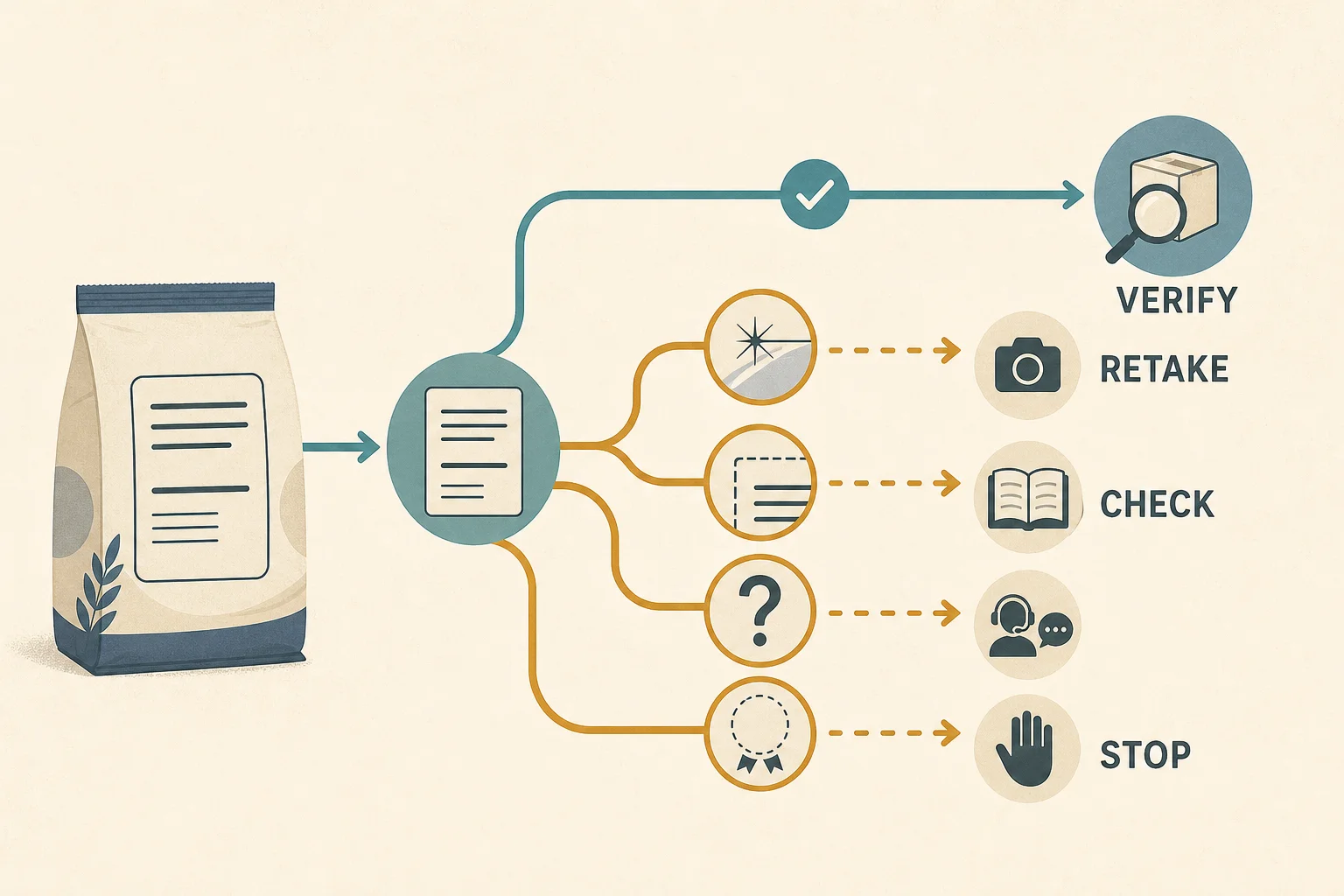
The recovery decision is simple. Retry once when the barcode itself was captured poorly. If the lookup still provides no usable current ingredients, photograph the label.

What the Barcode Actually Does

GS1 describes the GTIN as an identifier for a trade item. The identifier helps systems distinguish products and retrieve associated information. The printed bars do not function as a self-contained ingredient document.

Think of the barcode as a library call number. The number can point to a record, but the record must exist in the library you are using. It must also contain the fields you need.

Open Food Facts illustrates the database side of the workflow. It describes itself as a collaborative product database built from barcode scans, product photos, and label information contributed by users. That model can cover millions of packages and still leave gaps because products, markets, and formulations keep changing.

This distinction matters abroad. A product may be common in the destination and absent from the database used by your app at home. A retailer's checkout system can recognize it because that retailer maintains its own catalog, while a consumer food database may not have the same record.

Why the Same Brand Can Produce a Different Result

A brand name is not a unique ingredient record. The following differences can define a separate trade item or require separate data:

  • flavor
  • package size
  • multipack versus single item
  • local manufacturer or licensee
  • country-specific recipe
  • seasonal or promotional packaging
  • certification status
  • declared formulation

The GS1 GTIN Management Standard says a formulation change that affects legally required declared information can require a new GTIN. It also gives examples involving new allergens and certification changes. That supports an important shopping rule: a record for a similar product is not evidence for the current package.

Even when a GTIN remains the same under the applicable rules, a third-party database can lag behind a label update. Compare the retrieved image and ingredients with the package before relying on the record.

Decide Whether to Retry or Switch Inputs

Decide Whether to Retry or Switch Inputs

Retry the barcode when

  • the camera never focused
  • glare covered part of the code
  • the package was curved or wrinkled
  • your finger covered the quiet area around the bars
  • the app reported an unreadable code rather than a missing product

Flatten the package if possible, move away from glare, and hold the phone parallel to the code. One clean retry is reasonable.

Switch to the ingredient label when

  • the code scans but returns “not found”
  • the record has no ingredient list
  • the listed flavor or size differs
  • the record image shows another market
  • the physical ingredients disagree with the record
  • the record has no allergen or warning information
  • the package looks reformulated

Do not spend several minutes forcing the same lookup. The label-photo path exists for exactly this gap.

What to Photograph

The goal is not a beautiful package photo. The goal is a complete, readable decision record.

Capture:

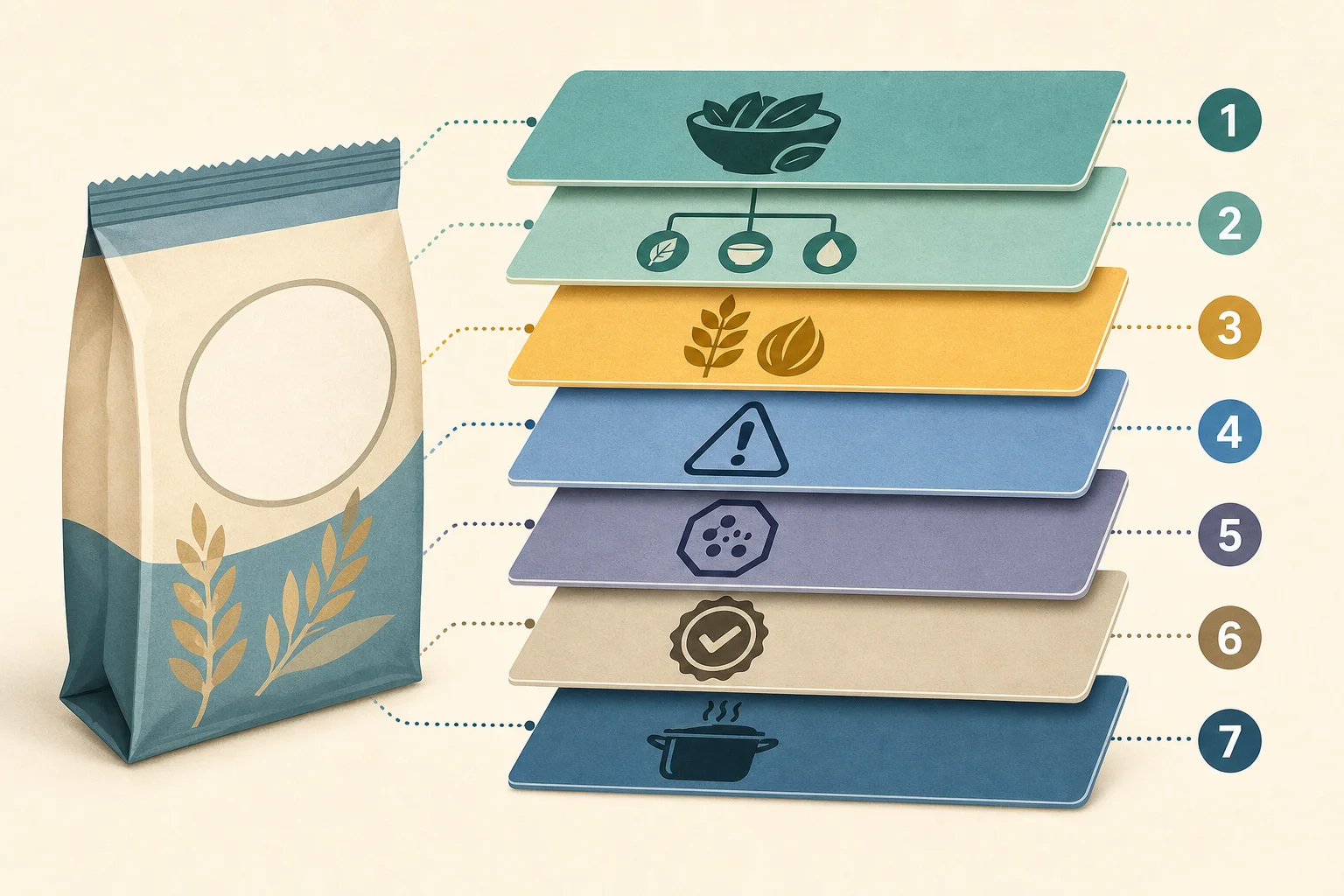
  1. the ingredient heading and full ingredient list
  2. every nested sub-ingredient
  3. the separate allergen statement, if present
  4. nearby “may contain” or facility wording
  5. any continuation panel around a fold or curve
  6. certification marks that affect your rule
  7. the product name or front panel when needed to distinguish the variant

Take overlapping images when the label wraps around a container. Include a few repeated words at the edge of each image so you can confirm where one panel continues into the next.

Make the Label Photo Usable

Make the Label Photo Usable

Image recognition can fail even when the text looks readable at arm's length. Phone cameras need enough pixels, contrast, and focus for the smallest characters.

Use this checklist:

  • Light: choose even light without a bright reflection.
  • Angle: keep the camera face parallel to the text.
  • Distance: move close enough for small type but keep every edge.
  • Focus: tap the ingredient panel and wait for focus to settle.
  • Stability: brace the package or phone when possible.
  • Shape: flatten flexible material and rotate curved containers.
  • Coverage: include the last ingredient and every warning.
  • Review: zoom in before submitting and retake unreadable lines.

Google's image-translation guidance says small, unclear, or stylized text may be translated less accurately. The same visual obstacles also limit text extraction for an ingredient check. A second photo is faster than trying to reason from missing words.

Preserve Label Structure After Capture

Once the text is available, keep its categories separate:

  • direct ingredients
  • compound-ingredient components
  • allergen declaration
  • precautionary warning
  • additive codes
  • certification or preparation notes

A flattened paragraph can hide whether “may contain milk” was a warning or whether milk appeared as a direct ingredient. Parentheses matter because they show which components belong to a seasoning, coating, sauce, or filling.

Use the label-name glossary for unfamiliar aliases and the E-number glossary for additive identifiers. When a generic ingredient does not disclose its source, a photo cannot invent that detail. Manufacturer or certifier confirmation may still be necessary.

Compare the Result With the Current Package

IngrediCheck can compare available information from a label photo with allergies, diets, preferences, and avoid rules saved in Food Notes. Separate profiles preserve different household decisions.

Review the reason behind the result:

  • Matched: no conflict was found in the available analyzed information.
  • Unmatched: a declared ingredient or rule conflict was identified.
  • Uncertain: the available information does not support a confident decision.

These terms are not safety grades. A Matched result can still be based on incomplete input or a label that does not declare cross-contact. An Uncertain result is useful when a photo is cropped, a translation is ambiguous, or an ingredient source is private.

Match critical output back to the package:

  1. Confirm that the extracted list begins and ends in the same place.
  2. Check nested parentheses and punctuation.
  3. Verify allergen and precautionary statements separately.
  4. Compare the named product variant.
  5. Investigate any conflict between the record and the package.

The current physical label wins over an older database record.

Plan for Weak Connectivity

A label photo is a fallback for missing product data, but it is not an offline workaround. IngrediCheck requires a network connection for a new photo upload and analysis.

Before grocery shopping abroad:

  • set up Food Notes before leaving reliable Wi-Fi
  • save important local allergen and ingredient terms
  • download any supported offline language packs
  • keep a written avoidance list
  • carry backup food for an unresolved shopping trip
  • decide in advance that a failed analysis means “not enough information”

Previously loaded information may remain available in a device cache. Do not interpret that as the ability to analyze a new package offline.

When to Stop Rather Than Retake

Do not keep scanning when the evidence cannot answer the decision.

Stop or contact the manufacturer when:

  • a critical warning is hidden under a permanent sticker
  • the ingredient source controls the decision but is not disclosed
  • the package is damaged or illegible
  • the label and retrieved record materially disagree
  • certification cannot be verified
  • connectivity prevents a new analysis
  • the product has no ingredient declaration where one is needed for your rule

For diagnosed allergies, a scanner is one part of preparation. The CDC Yellow Book recommends researching destination labeling rules, carrying medication and an action plan, and planning communication before travel.

Bottom Line

A barcode lookup is fast when the connected product record is present, current, and complete. When a foreign barcode returns no usable ingredients, switch to a carefully framed photo of the current label instead of guessing from a similar product.

IngrediCheck can support that recovery path by analyzing available label information against saved Food Notes and showing what matched, conflicted, or remained uncertain. Keep the physical package in the decision, and stop when missing text, connectivity, private sourcing, or cross-contact leaves the evidence incomplete.

Frequently Asked Questions

Why is a foreign food barcode not found?

The code may be valid while the lookup service has no matching record, the product is regional or new, the data is incomplete, or the printed barcode is difficult to scan. A barcode identifies a trade item; useful ingredients depend on a connected data source.

Does a barcode contain the ingredient list?

Usually no. Retail barcodes commonly encode a product identifier such as a GTIN. An app uses that identifier to retrieve product information from a database, which may be missing, stale, or incomplete.

What should I photograph after a barcode lookup fails?

Capture the complete ingredient list, nested sub-ingredients, allergen statement, precautionary warnings, and any panel where the text continues. Keep every line sharp and free from glare.

Should I trust an old barcode record or the package?

Use the current physical package as the decision source. Formulations and market variants can differ, and a database record may not reflect the exact package in your hand.

Can IngrediCheck analyze a new label photo offline?

No. New label-photo uploads and analysis require a network connection. If connectivity or image quality prevents a complete review, treat the package as unresolved.

Next Label Check

Follow the scanner, hub, and ingredient paths connected to this guide

Get the app for clearer label decisions.

Scan labels, see what fits your food notes, and read the why in plain English.

IngrediCheck app