Keto Food Scanner App: Check Carbs, Sweeteners, and Hidden Starches

Keto shopping is a label-reading problem before it is a recipe problem. A product can say keto, low carb, zero sugar, or net 3 carbs on the front and still deserve a closer look at serving size, Total Carbohydrate, fiber, sugar alcohols, starches, and sweetener system.

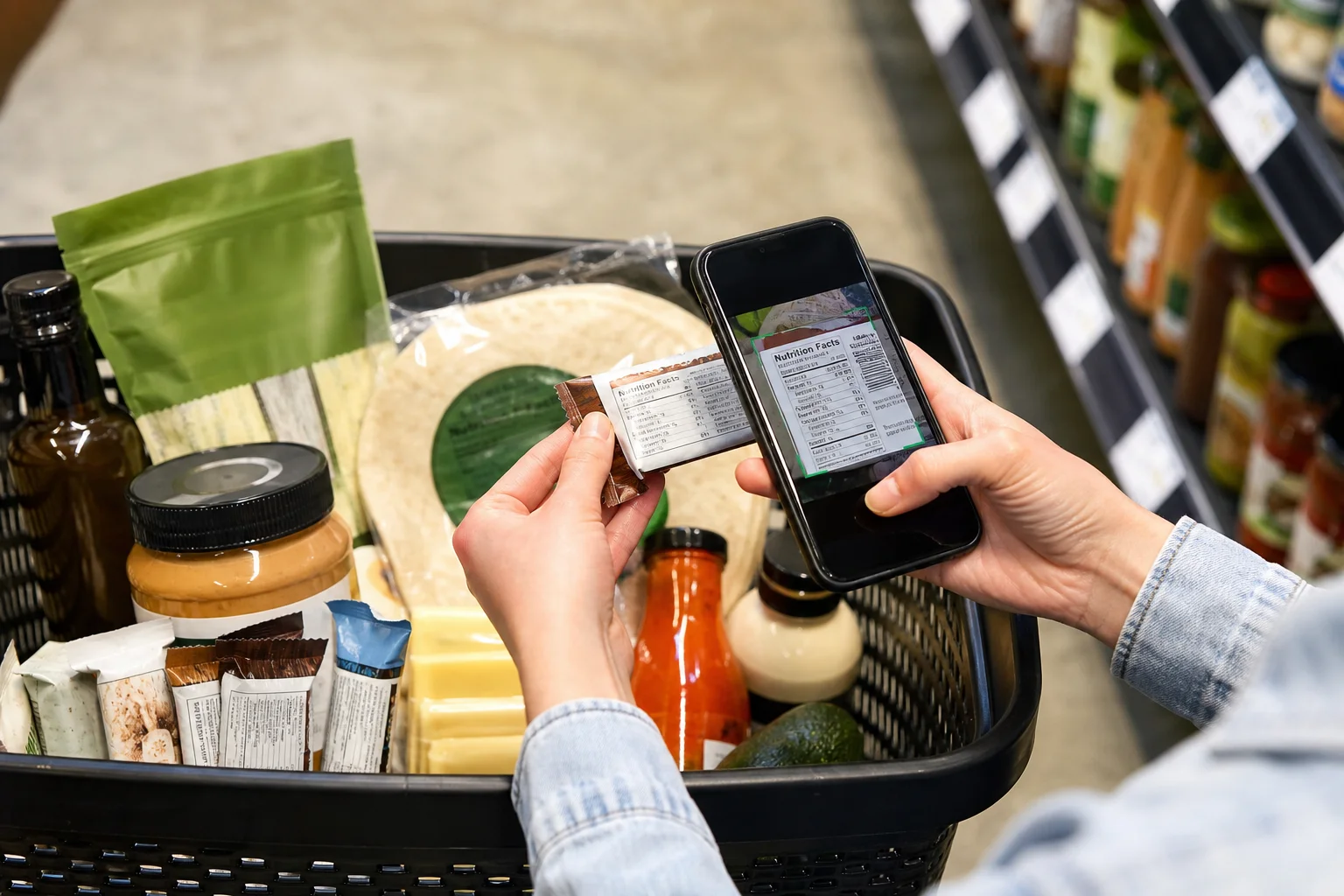
A keto food scanner app helps by turning that label review into a repeatable checklist. Scan the barcode or ingredient panel, compare the product against your saved keto rules, and review the specific carb and ingredient clues before you buy.
Keto Label Reading Starts With the Carb Target

Keto diets are very-low-carbohydrate diets designed to support nutritional ketosis. StatPearls' ketogenic diet review describes very-low-carbohydrate ketogenic diets as commonly limiting carbohydrate intake to about 20 to 50 grams daily, with moderate protein and a high fat share of calories.

That narrow carb range is why packaged-food labels matter. A sauce, bar, yogurt, electrolyte mix, or snack can use a meaningful share of a shopper's daily carb budget in one serving.

The app should not decide a medical diet for the user. It should help the user apply the carb and ingredient rules they already follow.

Start With Total Carbohydrate, Not the Front of the Package

Start With Total Carbohydrate, Not the Front of the Package

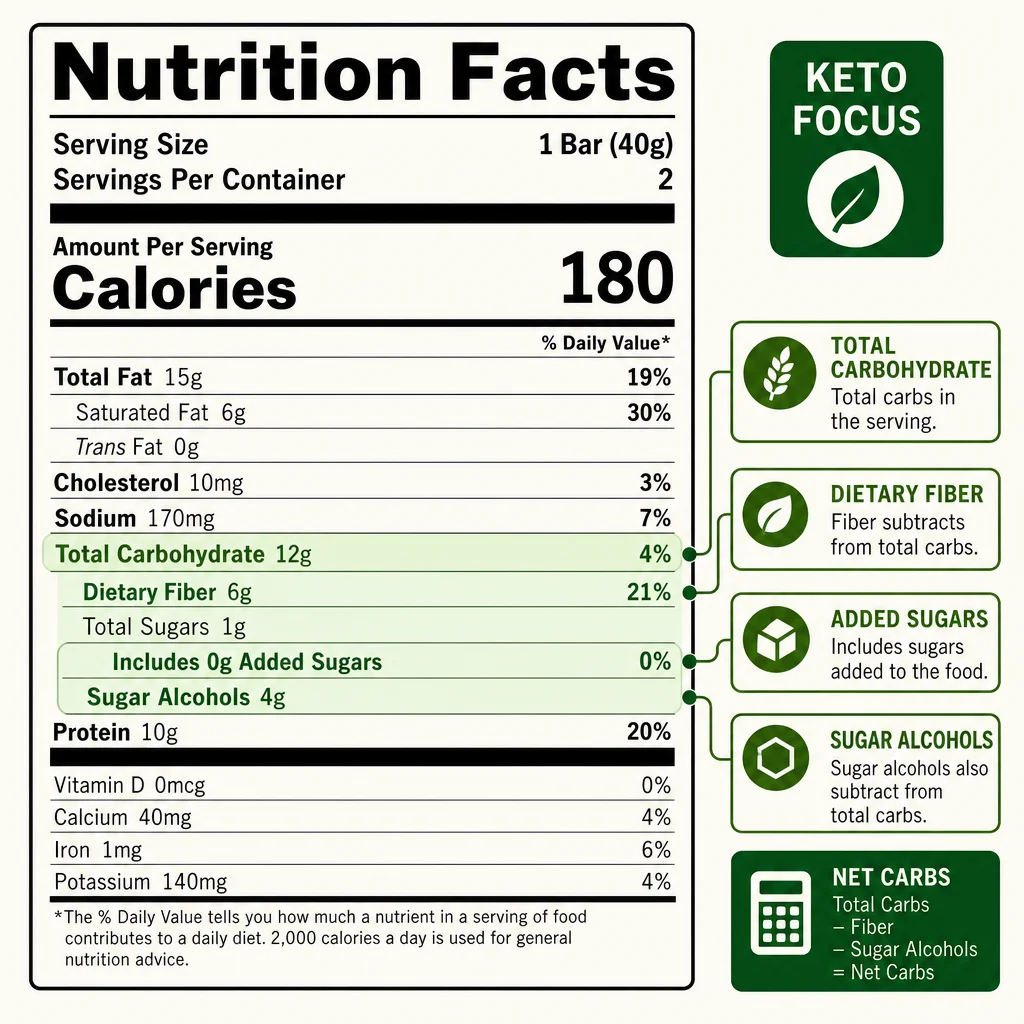
The Nutrition Facts panel has a regulated Total Carbohydrate line. Front-of-package net carb claims are different. They can be useful, but they are calculations, not the same kind of standardized label line.

StatPearls' low-carbohydrate diet review explains net carbs as fully digestible carbohydrate and describes a common calculation that subtracts fiber and part of sugar alcohols from total carbs. That is a diet calculation. It still starts with the Nutrition Facts panel.

For a practical scan, review:

  • serving size
  • servings per container
  • Total Carbohydrate
  • Dietary Fiber
  • Total Sugars
  • Added Sugars
  • Sugar Alcohols, when present
  • ingredient list

This protects you from a common trap: a product with a low-looking carb number but a tiny serving size.

Ingredients That Deserve a Keto Flag

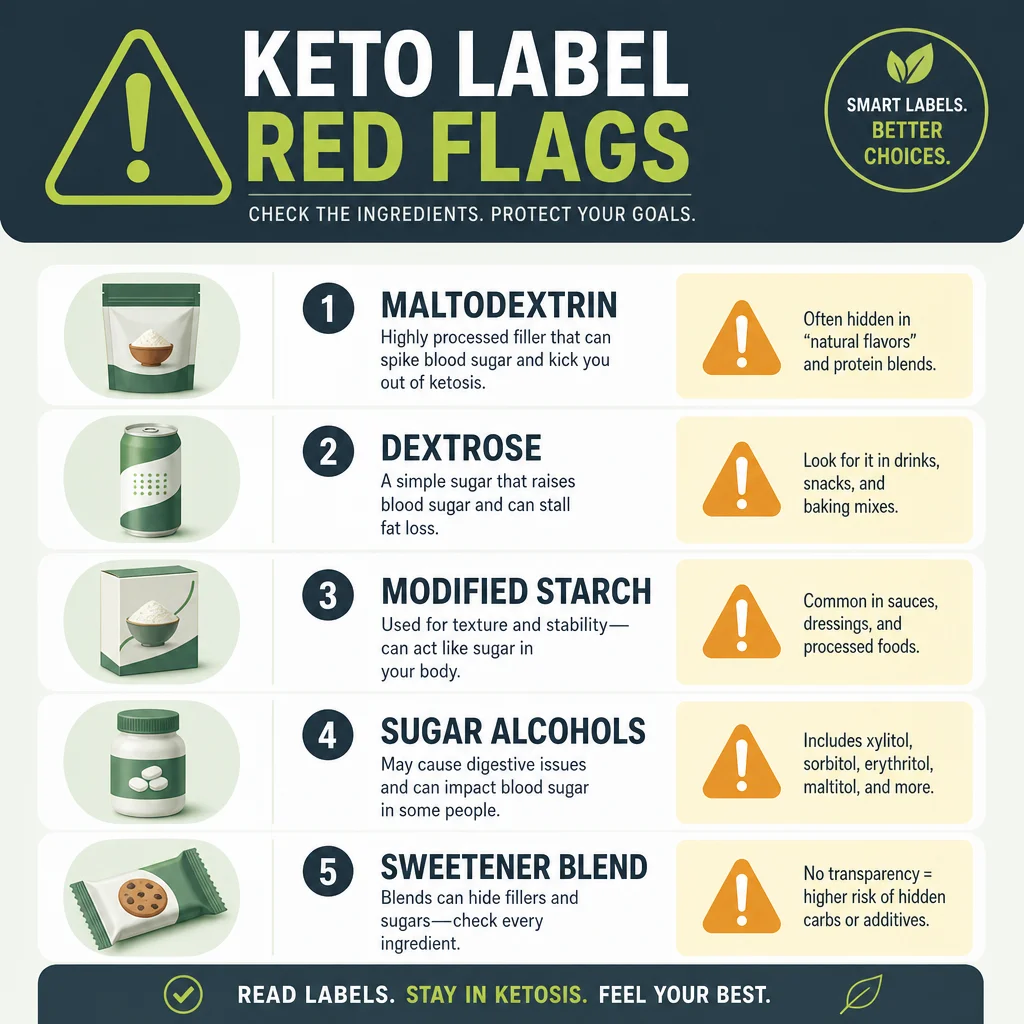
Keto shoppers often need to review ingredients that are not all named sugar. A saved scanner rule can flag the obvious sugars and the less obvious starches.

Common red flags include:

  • sugar
  • cane sugar
  • honey
  • agave
  • corn syrup
  • high-fructose corn syrup
  • dextrose
  • glucose syrup
  • maltose
  • rice syrup
  • maltodextrin
  • modified food starch
  • tapioca starch
  • potato starch
  • corn starch
  • wheat flour
  • rice flour

Maltodextrin is especially important because it is a starch-derived carbohydrate used in many processed foods, including powders, bars, sauces, and drink mixes. It may not read like table sugar, but it is still a digestible carbohydrate.

Sugar-Free Does Not Automatically Mean Keto-Friendly

Sugar-Free Does Not Automatically Mean Keto-Friendly

Sugar-free products can still contain ingredients that matter for keto shoppers. Some rely on sugar alcohols. Some use high-intensity sweeteners with bulking agents. Some have meaningful total carbohydrate from starches, fibers, or serving-size math.

The FDA's Nutrition Facts guidance explains the difference between Total Sugars and Added Sugars, and 21 CFR 101.9 defines how sugar alcohols can appear in nutrition labeling. A keto scanner should put those pieces next to each other.

For example:

  • A zero sugar soda may have no carbs but use sweeteners you personally avoid.
  • A sugar-free candy may contain sugar alcohols that affect tolerance.
  • A keto bar may subtract fiber but still contain starch-derived ingredients.
  • A no-added-sugar yogurt may still contain naturally occurring lactose.

This is why keto scanning needs ingredient rules, not only macro math.

Keto Marketing Claims Need a Second Pass

Keto-branded packaging can be useful when it points you toward lower-carb products, but it should not be treated as the decision. The label still has to fit your actual rule set.

Common claim traps include:

  • a keto bar with a serving size smaller than the way people actually eat it
  • a net carb number that subtracts fiber or sugar alcohols you personally count differently
  • a zero sugar product that still contains maltodextrin or starch
  • a low carb sauce where the serving size is one tablespoon
  • a keto cereal with sweeteners or additives you want to review

The scanner should help you compare the claim to the back label. If the front says keto but the Nutrition Facts panel and ingredients do not match your saved rules, the app should make that mismatch visible.

Keto Snacks Need Additive Review Too

Keto-branded snacks often rely on intensive formulation: fibers, starch replacements, sweetener blends, emulsifiers, oils, and preservatives. For many shoppers, the carb number is the first screen, but not the only screen.

If your keto rule set also includes additive or clean-label preferences, it can be useful to flag ingredients such as TBHQ, BHA, BHT, artificial sweeteners, or certain seed oils. Those ingredients do not define whether a food is keto, but they may matter to your personal food rules.

That is where a personalized scanner beats a keto-only macro calculator.

What a Keto Food Scanner App Should Do

A practical keto barcode scanner should:

  • read barcode data when available
  • support ingredient-label photo scanning
  • show Total Carbohydrate and serving size clearly
  • flag added sugars and sugar aliases
  • flag starches and maltodextrin
  • show sugar alcohols and sweetener systems
  • let users save personal thresholds
  • explain every flag in plain English

It should also avoid universal promises. People use keto for different reasons, including weight management, metabolic health goals, or clinician-guided nutrition plans. The app's role is label review against saved rules.

How IngrediCheck Helps

IngrediCheck lets you scan a food and compare it against your saved rules. For keto shopping, those rules might be:

  • flag Total Carbohydrate above my threshold
  • flag added sugar
  • flag maltodextrin, dextrose, glucose syrup, and starches
  • flag maltitol
  • flag sucralose or neotame
  • flag TBHQ, BHA, or BHT for additive review

That turns the grocery decision into a clearer review. You still decide whether the product fits your plan, but you do not have to memorize every hidden carb and additive clue.

For the broader scanner cluster, compare this page with the ingredient checker app guide, the sugar-free and no added sugar scanner, and the full ingredient checker and food scanner guides hub.

A Practical Keto Label Routine

Use this order when scanning packaged foods:

  1. Check serving size and servings per container.
  2. Review Total Carbohydrate.
  3. Note fiber and sugar alcohols, but do not ignore the starting carb number.
  4. Read Added Sugars.
  5. Scan ingredients for maltodextrin, dextrose, starches, and syrups.
  6. Review sweeteners and additive preferences.
  7. Compare similar products rather than forcing one questionable product to fit.

That is the workflow that keeps keto shopping honest.

Try It on Your Next Keto Label

Keto shopping gets easier when the carb math and ingredient review happen in the same place. IngrediCheck helps you scan the label, flag the hidden carb and sweetener clues, and decide whether the product fits the keto rules you already follow.

Next Label Check

Follow the scanner, hub, and ingredient paths connected to this guide

Frequently Asked Questions

What should a keto food scanner check first?

It should start with serving size, Total Carbohydrate, fiber, sugar alcohols, added sugars, and ingredient red flags such as maltodextrin, dextrose, and starches.

Are net carbs regulated by the FDA?

Net carbs are a marketing and diet calculation, not a standard Nutrition Facts line. The regulated label line to start from is Total Carbohydrate.

Can IngrediCheck tell me whether I am in ketosis?

No. IngrediCheck reviews food labels against saved rules. It does not measure ketones, provide medical nutrition therapy, or replace clinician guidance.

Get the app for clearer label decisions.

Scan labels, see what fits your food notes, and read the why in plain English.

IngrediCheck app